


How to Change the Battery in a Mercedes-Benz Key
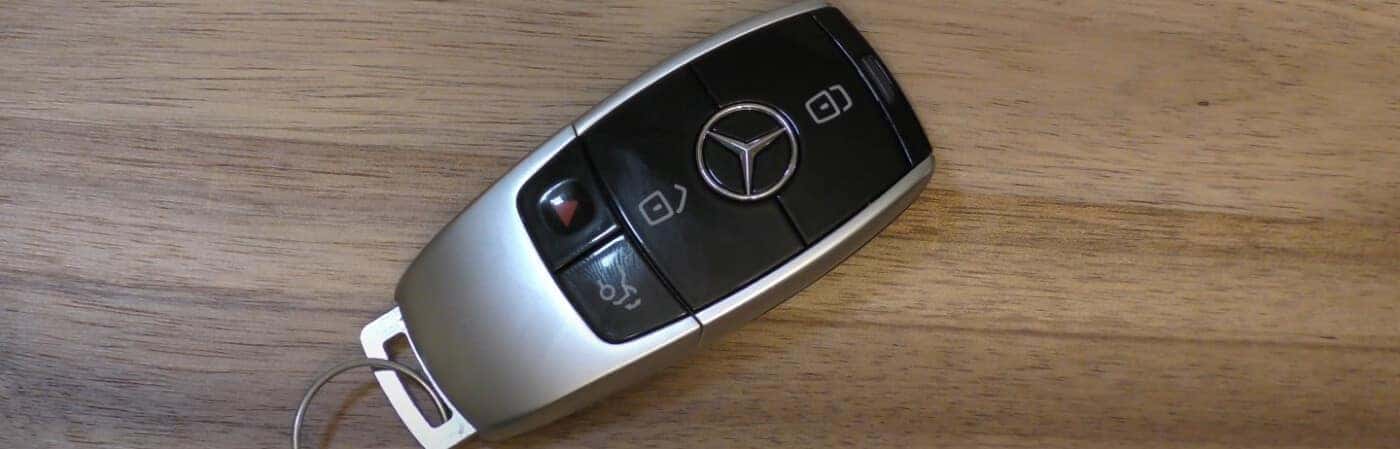
There’s nothing more frustrating than going to open your car and the key fob doesn’t respond. While you can still open the doors manually, it throws you off your stride. Mercedes-Benz drivers of San Antonio and Alamo Heights will be happy to know that replacing the battery in a Mercedes-Benz key fob is easy! At Mercedes-Benz of San Antonio, we have the guide that will walk you through replacing your key fob battery so you can get back to enjoying the regular convenience of your key fob.
Types of Mercedes-Benz Key Fobs
Mercedes-Benz has two different types of key fobs, and that type will determine how many CR 2025 batteries it will need. The type of key fob will also determine how to change the battery. Stop by the parts center at Mercedes-Benz of San Antonio if you need a new battery or if you’re unsure whether you need a new key fob altogether.
- Smart Key: This key fob is used with the older Mercedes-Benz models. It is usually made of plastic and will require two batteries.
- Chrome Key: This key fob with a metal casing is found with the newer Mercedes-Benz models. The older version of this key requires two batteries, while the newer version only requires one.
Another way to distinguish between the key fobs is by looking at the panic button. The newer version has a triangular shaped panic button and the older version has a circular shaped panic button.
Changing Your Mercedes-Benz Key Fob Battery
Once the type of Mercedes-Benz key fob is known, they each have a slightly different process for opening the key fob and changing the battery.
Opening a Smart Key:
- To remove the key from inside the fob, pull the sliding tab on the side of the key.
- There will be a slot that is on the opposite side of where the key can be inserted completely, use the key and push down towards the fob.
- Once the back of the key is free, take out the old battery and put the new one in place.
Opening a Chrome Key:
- To release the key from the fob, pull the silver, square shaped tab on the bottom of the Chrome Key.
- After removing the key, a small gap will appear. Push the key into the gap to press the internal tab and release the back cover
- Once the back cover is free, take out the old battery and put the new one in its place.
Note: When replacing the battery, make sure the positive and negative sides are facing the right direction.
Learn More About Mercedes-Benz at Mercedes-Benz of San Antonio!
If you have more questions about your Mercedes-Benz key fob battery, contact us at our service center near Shavano Park. Our expert technicians can help you with anything from routine Mercedes-Benz service costs to scheduling collision repairs. Be sure to browse our service specials to keep your Mercedes-Benz service costs budget-friendly.
More from Mercedes-Benz of San Antonio
What Are the Standout Features of the Mercedes G Wagon Interior?
You know the satisfying, heavy click of a steel bank vault locking into place. That is the exact sound the door makes when you step inside the Mercedes G Wagon interior. The moment you pull it shut, the heat and noise of San Antonio traffic completely disappear. Pulling up to a nice dinner in the…
How the Mercedes-Benz GLE 63 AMG® Delivers Luxury and Power for Texans
Surviving a mid-July drive down Loop 1604 requires great air conditioning and seats that actually breathe. Many luxury SUVs offer basic comfort to handle the intense Texas heat. The Mercedes-Benz GLE 63 AMG® takes a different approach. It pairs a high-end cabin with the raw speed of a race car. Driving this vehicle changes a…
What is the Most Reliable Truck for San Antonio Heat and Highway Miles?
When you live in San Antonio, your truck needs to be able to handle stop-and-go traffic in the Mixmaster while it’s 105 degrees, tow a trailer down the coast without the transmission giving out, and survive endless construction zones that put suspension components through the ringer. Northside Fleet Center specializes in the heavy-duty reality of…